Adding Buy Now links
With Glassboxx, a publisher can add links anywhere on their own websites from which the end customer can purchase an audiobook or eBook using Glassboxx. These links can be added into the content of any non-ecommerce product pages, author pages or other static pages, and even to the body of HTML emails.
On clicking the BUY NOW the end customer is taken to the checkout on Glassboxx with the product they want already added into it. The Glassboxx checkout handles payment handling allowing the end customer to complete their purchase, and once confirmed, signposts them to the Glassboxx apps.
1. Adding a Buy Now button
As you can see form the video below, by copy/pasting the following code from the BUY NOW link section of the book product in the Glassboxx vendor panel into any site, a standalone BUY NOW button will be incorporated into the content of any page. The BUY NOW button relates to a particular ISBN allowing a specific product to be added to the basket for the end customer’s checkout.
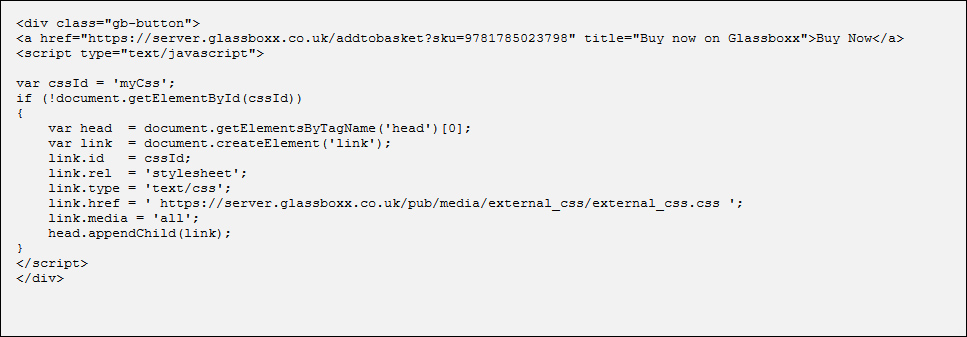
An example of a page on this site where the BUY NOW button has been added in this way is here.
2. Adding a Buy Now area
By copy/pasting the following code from the BUY NOW area section of the book product in the Glassboxx vendor panel into any site. The BUY NOW area consists of the cover image of the title, title name, format and price. It can be incorporated into the content of any non-ecommerce page or HTML email.
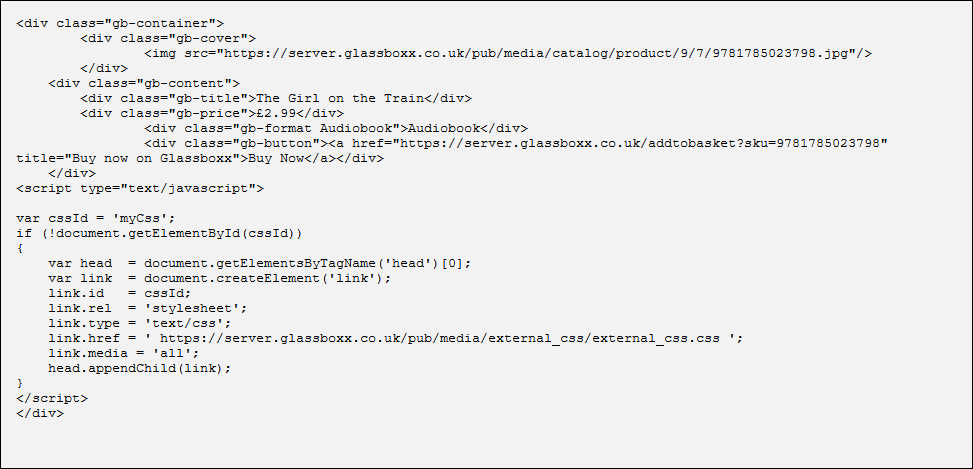
A example of a page on this site where the BUY NOW area has been added in this way is here.